

I want to share with you some of the essays I wrote for declamation contests during school. Here are some I wrote when I was in classes IV and V:

I want to share with you some of the essays I wrote for declamation contests during school. Here are some I wrote when I was in classes IV and V:
How to run Linux scripts on Windows.
Running Linux shell scripts on Windows is very useful to me. We may need to tweak some scripts depending on the environment in use.
One of the best ways to run them, is within Cygwin. This is something I have already written about.
If Cygwin is too bulky for you, you can use UnxUtils. This is a small set of widely used Linux Utilities, and includes the zsh shell. If you use this you will need to limit the scripts to those that use the commands available within this set. However, it still packs in a lot of paunch.
You might need to ensure the file path syntax expected by the given script matches the environment. Cygwin supports both forward-slash and backward-slash. However, please check the documentation/test to see what works.
Last option, is to run Linux on Windows using Virtual PC. That’s the best bet if you can invest the time needed to do the setup. Instructions are available here. However, this will not be able to access your Windows file system. If that is important for you (like it is to me in most cases), please stick to Cygwin. On the other side, if you are testing code that will eventually run on a Linux machine, the VPC method is better.
Portable software refers to programs that can be stored onto a media (such as USB drives, CDs, external harddisks etc.) and run directly from there on multiple computers. In other words, software that you can move from one computer to another without the need to re-install.
There are a lot of sites that provide such software for download. Google for “portable software” in general, or, say for “portable firefox” in particular. My favourite portable apps are the GIMP, and portable FileZilla (a GUI FTP tool).
Cygwin is a Linux like environment for Windows. It can run within Windows and access the filesystem. Its very useful to people like me who need Windows as the main OS, but need to test Linux shell scripts and other utilities. I even have a portable version of Cygwin, created based on these instructions. In fact, I was able to improve the procedure slightly. If someone needs help, please contact me through comments. I want to upload the ISO of the DVD created – if someone can provide the bandwidth and hosting space, I can mail a copy of the DVD to him.
How to detect problems pertaining to randomness of numbers using Benford’s law. The theory can be used to detect fraud, evasion of rules etc.
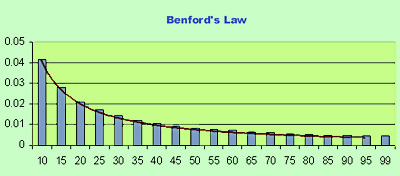
Suppose you have some financial data – let us say all the vouchers paid by the company in a given month, and you want to run some tests to determine if there are any anomalies. For example, are the employees beating the approval process by entering say $24.99 vouchers if the limit is $25, or if any fraud is being committed. One way to do this is to use Benford’s law.
Benford’s law states that in a given list of numbers generated naturally (for example stock prices or census figures), the probability of a number starting with 1 is 30.1%. The probability of a number starting with 2 is 17.6% and so on – it keeps decreasing as the numbers increase. The rationale behind it is explained as: it takes a 100% increase to take a number from 100 to 200. However, it takes only a 50% change to go from 200 to 300. 100% increase is more difficult to do (and thus has less probability of happening) than a 50% increase.
In this way, the probability of having a number starting with digit d is given by log(1+1/d), log to base 10. More information is available here. Its usually extended to the first two digits for analysis in the real world.
Download from here a spreadsheet (called Numeric Truth) to carry out this analysis for you. All you have to do is to paste your data into the green cells. After that, on the first sheet it will show the results of first digit analysis, and on the second sheet, two digit analysis. Have a look at the graph, the variances for the individual digits, and the total variance. That should give you a starting point for your analysis/audit.
Here is one of my nature photographs, from the recent collection Wild flowers of Indian summer:

Like it? Post comments.
There are some problems if you try to install Knoppix within MS Virtual PC 2004. This post shows you how to get it right.
Knoppix is a Linux flavour that can run directly off a CD or DVD. All you have to do is boot off the CD and it starts running – it has all the basic applications like Internet Browser, Wordprocessing application etc. If you have FAT partitions, you will also be able to write to the disk.
However, I prefer booting into Windows and then running Knoppix as an application. (Although, I have a separate Debian installation as well for my main Linux needs.)
This can be done through Microsoft Virtual PC. I use the 2004 version dowloadable here. Also you need to have an ISO of the Knoppix CD. If you have a CD, you can make an ISO yourself, or download here.
Start MS VPC 2004, create a virtual harddisk and load the ISO, then reboot the VPC machine. Now follow the instructions below:
Most of the steps should also apply if you want to install Knoppix on a normal HDD. Why we have to go this route – for example why mouse isnt working – beats me. Could be bugs – I have collected all this information from different places on the web, according to the problems I faced. If you know why we have to do this way, please place comments. Also, suggest improvements and let me know if this helped.
Have nothing substantial to say today, will share a joke:
Fed up with his nephew boasting about how good he was at flight-simulator games, a colleague, who is a pilot, decided to give him a taste of the real thing and took him for a ride in his 2-seater plane.
At about 60 meters over the countryside, my friend looked across to his nephew and asked what he thought so far. “Wow”, replied the boy, “nice graphics!”
There was a young lady called Kate,
who played in the dark with her date.
When asked whether he had seduced her,
she smiled and said – no it amused her,
My dear, it wasn’t a man – it was a computer.
There was a young lady named Mabel,
so ready, so willing, so able.
One day full of spice,
asked her boss his price,
Alas! his “lap top” wasn’t affordable.
A poor lass wishing to learn computer,
went in search of a helpful tutor.
He said “My fee would be in kind”,
She replied “Oh, I dont mind”,
For – paying it in cash didnt suit her.
There was a pompous young girl from the heights,
Who said “I have my own website!”,
to impress the young man beside her.
She thought he would be, but he was wiser you see,
For he said “are you a lady or spider?”
When I was in Amritsar, I visited the Pingalwara Society. In Punjabi Pingalwara literally means ‘a home for the crippled’. It was the brainchild of Bhagat Puran Singh. It has a lot of centers and looks after people given up by their children, mentally ill patients and terminally ill people. The main guiding principle was also laid down by Bhagat Puran Singh, that those who are unable to earn a living should be helped by others. Some pictures: 


Talking about life two five year olds through a poem on frogs.
I remember this poem we had to memorise in second standard. Not the full poem but the gist of it. Here it goes:
Twenty froggies went to school, down beside a rushy pool,
Twenty little coats of green, twenty vests all white and clean.
“We must be in time”, said they; “First we study, then we play;
That is how we keep the rule, when we froggies go to school.”Master Froggy, grave and stern, called the classes in their turn,
Taught them how to nobly strive; likewise how to leap and dive;
From his seat upon a log, showed them how to say “Kerchog!”
Also how to dodge a blow from the sticks which bad boys throw.Twenty froggies grew up fast, big frogs they became at last;
Not one dunce among the lot; not one lesson they forgot;
Polished to a high degree, as each froggy ought to be,
Now they sit on other logs, teaching other little frogs.
Although I still have the book, instead of typing I have copied it from here, and its attributed to a compilation by H.R. Pattengill.
The poem tears past the years of dust that has settled on the memories. Why it does that I cant say. It does provide an interesting way to convey life to five year olds with amazing clarity. If life can be explained through a poem on frogs in this way, then it cannot be as complex as we consider it as grown-ups.
I have made a timelapse video of the drying of a coconut. Please have a look:
If you are unable to see the video click here.
Six degrees of separation is a hypothesis that every human being knows every other human being through six people. In other words for any two people A and B, either A knows B (1 degree of separation), or A knows someone who knows B (two degrees of separation) and so on.
There have been experiments to verify if this is true in practice. In one experiment, called the Small world experiment and conducted by Columbia University – each volunteer was given the name of a person with some details (like the place he lived in) and was asked to contact the person either directly (if he knew him) or to forward the request to someone who he thought was “closer” the person. I also participated in the experiment, and was asked to contact someone in Russia – I sent it to the only person who I knew in Russia! Someone should also have contacted me, but no one did – I guess I broke the chain 🙂
The experiment found that “social searches can reach their targets in a median of five to seven steps”.
Today, this can be easily verified through data contained in social networking sites like Facebook and Orkut. Indeed, there is a Facebook application that estimates average separation to be 5.73 and maximum 12. Interesting, isnt it?